System Design Interviews: A Beginner's Roadmap
SkillVeris Team
Careers Team
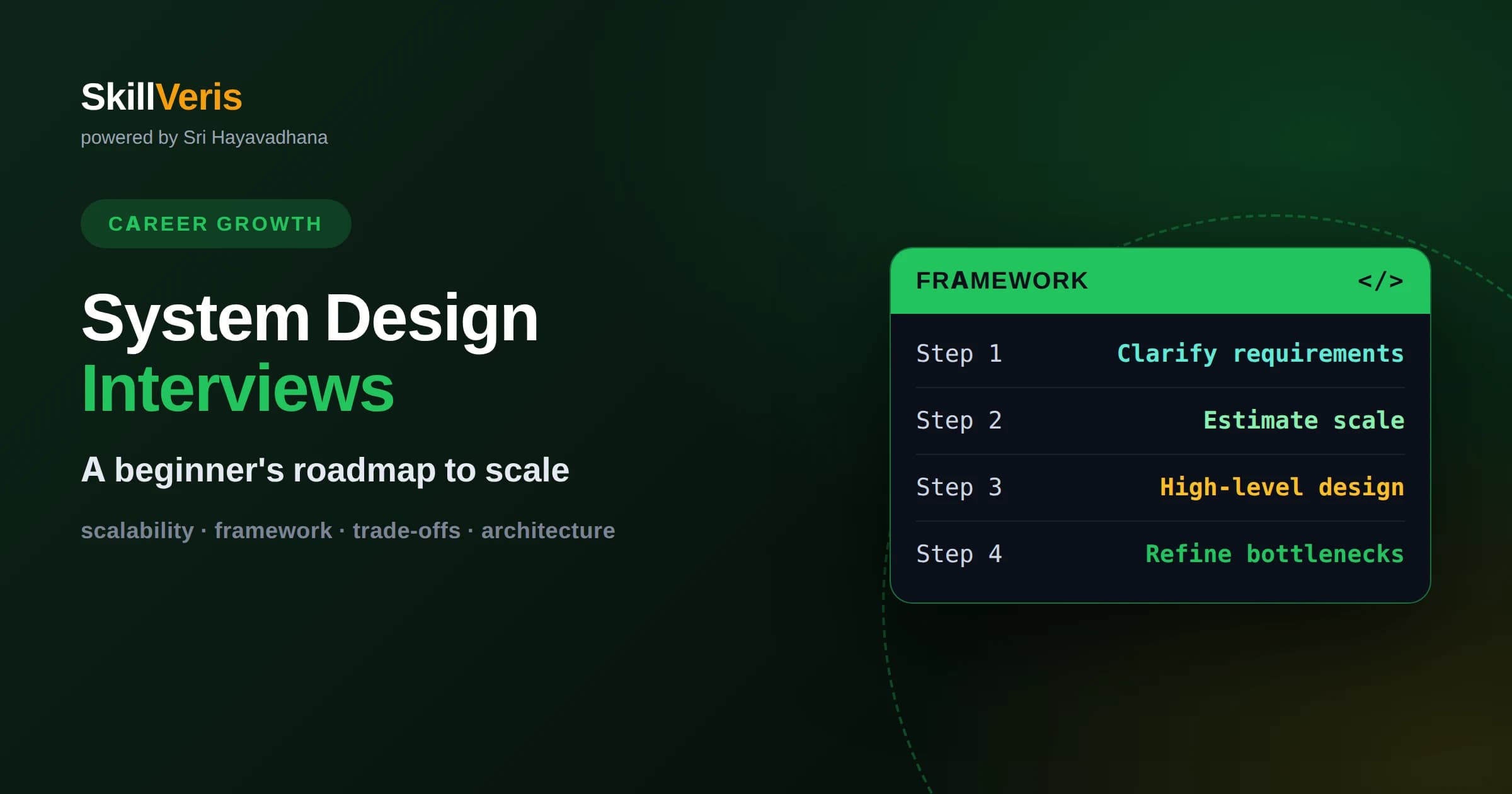
System design interviews evaluate how you structure large-scale systems and reason about trade-offs, not memorized answers.
In this guide, you'll learn:
- A repeatable framework of clarifying, estimating, designing, and refining keeps open-ended questions manageable.
- Core building blocks like load balancers, caches, databases, and queues appear in nearly every design.
- Communicating your reasoning out loud matters as much as arriving at the final architecture.
1What System Design Interviews Actually Test
A system design interview evaluates how you architect a large-scale software system from a vague prompt, reasoning through trade-offs out loud rather than recalling a single correct answer. The interviewer wants to see how you think, structure a problem, and justify decisions under realistic constraints.
Unlike a coding interview with a precise solution, system design questions are deliberately open-ended. A prompt like design a photo-sharing service has countless valid answers. What matters is whether your design is sound, scalable, and backed by clear reasoning.
This is why memorizing a single reference architecture does not work. Interviewers probe your choices, change requirements mid-conversation, and watch how you adapt. Understanding the underlying principles lets you handle any prompt, even one you have never seen.
2Who Faces These Interviews And When
System design interviews are common for software engineering roles beyond the entry level, and increasingly appear even for newer engineers at some companies. As you gain seniority, they carry more weight because designing systems is a larger part of the job.
If you are early in your career, do not be intimidated. Interviewers calibrate expectations to your experience level. For a beginner, they want to see structured thinking and awareness of core concepts, not the polish of a veteran architect.
The good news is that system design is learnable. The building blocks are a finite set of well-understood components, and the reasoning follows recognizable patterns. With deliberate practice, the open-ended format goes from terrifying to approachable.
It also mirrors real work more closely than any other interview format. On the job you rarely receive perfectly specified problems; you get vague goals and must ask questions, weigh options, and design something workable. Getting comfortable with that ambiguity pays off well beyond the interview itself.
3A Framework To Structure Your Answer
The single most valuable thing you can bring is a repeatable framework, so you are never staring at a blank canvas. A reliable structure has four phases: clarify the requirements, estimate the scale, design the high-level architecture, then refine and address bottlenecks.
Following this sequence signals maturity. It shows you do not jump straight to drawing boxes but first understand the problem, then design deliberately. Interviewers notice candidates who bring order to ambiguity.
Keep the framework flexible. Real conversations loop back as new requirements surface. The point is not to march rigidly through steps but to always have a sensible next move rather than freezing when the problem feels overwhelming.
Announcing your framework at the start also sets a professional tone. Telling the interviewer you will first clarify requirements, then estimate scale, then design, and finally refine, shows you have a plan and lets them follow along. It turns an intimidating open problem into an organized, collaborative walkthrough.
4Step One: Clarify The Requirements
Never start designing before you understand what you are building. Spend the first minutes asking questions. Who uses this system? What are the core features it must support? Are there features you can safely leave out of scope for now?
Separate functional requirements, meaning what the system does, from non-functional requirements like how fast, how reliable, and how scalable it must be. A chat app that must deliver messages instantly demands different choices than a report tool that can take seconds.
This step is not busywork. It shows you gather requirements before building, exactly as you would on the job. It also narrows an impossibly broad prompt into something concrete you can actually design, and it prevents you from solving the wrong problem.
5Step Two: Estimate The Scale
Rough estimation shapes your entire design. A system serving a few hundred users can run on a single server, while one serving millions needs distribution, caching, and careful data partitioning. You cannot make good choices without a sense of scale.
Do quick back-of-the-envelope math. Roughly how many users are active? How many requests per second might that generate? How much new data is stored each day? Precision is not the goal; order of magnitude is. Interviewers want to see that scale informs your decisions.
These estimates justify your architecture. When you later add a cache or split a database, you can point to your numbers and explain why. Design decisions grounded in estimates are far more convincing than ones that appear arbitrary.
6Step Three: Sketch The High-Level Design
Now draw the big picture. Start with the major components and how they connect: clients, a load balancer, application servers, databases, and any caches or queues. Keep it simple at first and get data flowing end to end before adding detail.
Walk through a core user action step by step. For a photo-sharing app, trace exactly what happens when a user uploads a photo and when another user views it. This narrative demonstrates that your components actually work together, not just that you can name them.
Resist the urge to over-engineer immediately. A clean, working high-level design is a strong foundation. You can always add sophistication in the next step once the basic structure is agreed upon and understood.
Check in with the interviewer once the high-level design is on the board. Confirming that your overall shape matches what they expect prevents you from investing time refining a direction they did not have in mind. A brief alignment here keeps the rest of the conversation productive.
7The Core Building Blocks To Know
A handful of components appear in nearly every design, and knowing them well covers most of what you need. A load balancer spreads incoming traffic across many servers so no single machine is overwhelmed and the system stays available if one fails.
A cache stores frequently accessed data in fast memory so you avoid repeatedly hitting a slower database, dramatically improving speed under load. A database stores your data durably, and choosing the right type for your access patterns is a key decision.
A message queue lets components communicate asynchronously, smoothing out spikes and decoupling parts of the system so a slow step does not block everything else. Learn what each block does and when to reach for it, and most designs become assembly rather than invention.
A content delivery network is another common piece, serving images, videos, and files from locations close to users so downloads are fast worldwide. Knowing this small vocabulary of components, and the specific problem each one solves, lets you compose an answer to almost any prompt without inventing anything from scratch.
8Choosing The Right Database
Database choice is a recurring theme. Relational databases organize data into structured tables with strict relationships and are excellent when data is highly connected and consistency is critical, such as financial records.
Non-relational databases trade some of that structure for flexibility and scale, handling huge volumes of loosely structured data or very high write rates more gracefully. Many large systems use several database types together, each for the job it suits best.
In the interview, do not just name a database; justify it. Explain why your data and access patterns fit the choice, and acknowledge the trade-offs. Showing you understand why one option beats another for this problem is exactly what interviewers reward.
As systems grow, a single database often cannot hold all the data or serve all the traffic. Techniques like splitting data across multiple machines and keeping read-only copies to spread load become necessary. You do not need deep expertise as a beginner, but knowing these options exist lets you gesture at how your design would scale.
9Scaling And Handling Bottlenecks
Step four is refining your design to handle scale and failure. There are two broad ways to scale. Vertical scaling means using a bigger, more powerful machine, which is simple but has hard limits. Horizontal scaling means adding more machines, which scales further but adds coordination complexity.
Identify the bottlenecks in your design and address them one at a time. If the database is overwhelmed by reads, add a cache or read replicas. If a single component is a choke point, replicate it behind a load balancer. Make each change in response to a specific pressure.
Also consider failure. What happens when a server dies or a data center goes offline? Discussing redundancy and graceful degradation shows senior-level thinking, because real systems must keep working when parts of them break.
10Everything Is A Trade-Off
The single most important mindset for system design is that there are no perfect solutions, only trade-offs. Every choice gives you something and costs you something. Adding a cache improves speed but introduces the challenge of keeping cached data fresh.
Strong candidates make trade-offs explicit. Instead of claiming a design is simply the best, they say what it optimizes for and what it sacrifices. This honesty demonstrates depth and mirrors how real architecture decisions are actually made.
A classic example is the tension between strong consistency and high availability in distributed systems. You often cannot maximize both at once and must choose based on the product's needs. Naming these tensions puts you ahead of candidates who ignore them.
Tie every trade-off back to the requirements you gathered at the start. A banking system may demand strict correctness even at the cost of speed, while a social feed can tolerate slightly stale data in exchange for staying fast and available. The right choice depends entirely on what the product actually needs.
11Communicate As You Design
System design interviews are conversations, not silent exams. Think out loud so the interviewer can follow your reasoning. A design arrived at silently is worth far less than a slightly weaker design explained with clear, confident reasoning.
Treat the interviewer as a collaborator. Check in on your assumptions, invite feedback, and adjust when they steer you. They often nudge you toward areas they want to explore, and responsiveness signals that you would work well on a real team.
Manage your time and stay organized. Do not sink twenty minutes into one small detail while the overall design remains unfinished. Keep a mental map of the whole problem and allocate attention to where it matters most.
Handle feedback gracefully. If the interviewer points out a flaw, do not get defensive; acknowledge it and adjust. Being coachable in real time is a strong positive signal, because it shows you would take feedback well from colleagues and improve your designs rather than defending them stubbornly.
12Practice Your Way To Confidence
The only reliable path to system design confidence is repetition. Take a well-known product, design it end to end using the framework, and say your reasoning out loud as if an interviewer were listening. Then critique your own trade-offs and try again.
On SkillVeris you can build the underlying skills through hands-on courses in cloud architecture, databases, and scalable systems, so the building blocks feel familiar when the pressure is on. Study the concepts, practice the framework, and walk into your interview ready to reason, not recite.
Get The Print Version
Download a PDF of this article for offline reading.
About the Publisher
SkillVeris Team
Careers Team
Our careers team helps you navigate tech job markets, build portfolios, and land the roles you want.
View all postsRelated Posts
Never miss an update
Get the latest tutorials and guides delivered to your inbox.
No spam. Unsubscribe anytime.