Learn to Code in 2026: A Complete Roadmap
SkillVeris Team
Careers Team
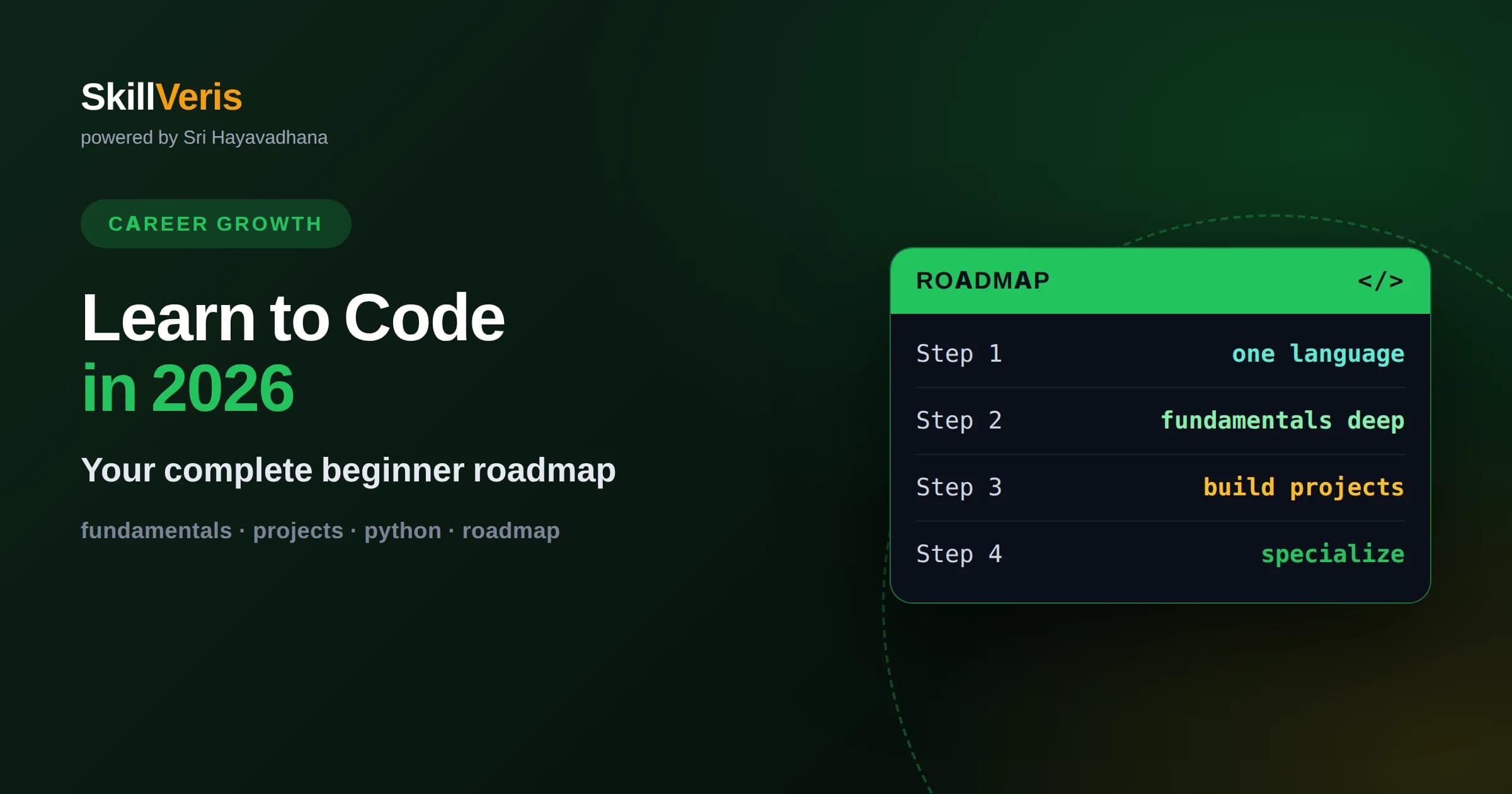
The proven path is to pick one beginner-friendly language, learn the fundamentals deeply, and build real projects rather than chasing every trend.
In this guide, you'll learn:
- Consistency beats intensity: steady daily practice over months turns beginners into capable developers far more reliably than cramming.
- Projects and a portfolio are what actually make you job-ready, because they prove you can apply concepts, not just recall them.
- AI tools are powerful helpers in 2026 but do not replace understanding fundamentals, which remain the foundation of every coding career.
1The 2026 Roadmap in Brief
To learn to code in 2026, the reliable path is to choose one beginner-friendly language, master programming fundamentals through steady daily practice, build progressively harder real projects, and then specialize toward the kind of work you want. That sequence has not fundamentally changed even as tools and trends have, because it matches how humans actually learn a complex skill.
What has changed is the abundance of help around you: high-quality courses, active communities, and AI assistants that can explain concepts and unstick you in seconds. These make learning faster than ever, but only if you use them to deepen understanding rather than to skip it. The roadmap below assumes you want durable skill, not just working code you cannot explain.
Expect the journey from absolute beginner to job-ready to take many months of consistent effort, not weeks. Anyone promising instant mastery is selling something. With realistic expectations and steady practice, though, this is an entirely achievable goal for almost anyone willing to persist.
2Get Clear on Why You Want to Code
Before choosing a language or a course, get specific about your goal, because it shapes every later decision. Wanting to build websites, analyze data, create mobile apps, or work in AI each points toward different languages and paths. A clear destination keeps you from wandering and quitting.
Your reason also fuels persistence. Learning to code has hard, frustrating stretches, and a concrete motivation, whether a career change, a project you want to build, or a problem you want to solve, carries you through the moments when it stops being fun. Vague curiosity rarely survives the first real obstacle.
You do not need perfect clarity, just a working direction. Even a rough goal like I want to build web applications is enough to make the early choices for you and to give your effort a purpose beyond abstract self-improvement.
3Pick One Beginner-Friendly Language and Commit
The most common beginner mistake is jumping between languages, so pick one and commit to it for the long haul. Python is an excellent default because its readable syntax lets you focus on concepts rather than punctuation, and it serves web, data, automation, and AI work. JavaScript is the other strong choice if you are drawn specifically to building for the web.
The truth that liberates beginners is that programming fundamentals transfer between languages. Loops, conditionals, functions, and data structures work the same way everywhere, so your first language is a vehicle for learning to think like a programmer, not a lifelong marriage. You can learn others later far more easily.
Resist the pull of whatever language is trending this month. Depth in one language beats shallow exposure to five, and the confidence you gain from truly understanding one is what makes the second and third languages quick to acquire.
4Master the Fundamentals Deeply
Spend real time on the core building blocks: variables, data types, conditionals, loops, functions, and basic data structures like lists and dictionaries. These fundamentals are the vocabulary and grammar of programming, and every advanced topic assumes fluency in them. Rushing past them creates cracks that widen later.
Understand, do not memorize. The goal is to grasp why a loop works and when to use one, so you can apply it to problems you have never seen. Memorizing syntax without understanding leads to helplessness the moment a problem differs from the example, whereas real understanding transfers everywhere.
Give this stage patience. It is tempting to skip ahead to exciting frameworks, but a developer with rock-solid fundamentals and no framework learns any framework quickly, while a developer who memorized a framework without fundamentals is stuck the moment something breaks.
5Learn by Doing, Not Just Watching
Coding is a skill like playing an instrument, learned through practice rather than observation. Watching tutorials feels productive but creates an illusion of competence; you understand while watching yet freeze when facing a blank editor. The cure is to write code yourself, constantly, from the very beginning.
For every concept you learn, immediately use it in small exercises and experiments. Type the examples rather than copying them, break things on purpose to see what happens, and try variations. This active engagement is where actual learning occurs, and it is the single biggest differentiator between people who learn to code and people who perpetually plan to.
Expect to be stuck often; being stuck and working through it is the core of the skill. Every bug you solve yourself teaches more than a dozen tutorials watched passively, because the struggle is what wires the understanding into place.
Beware the tutorial trap, where you complete course after course yet cannot build anything on your own. The escape is to close the tutorial regularly and build something small from a blank file, forcing yourself to recall and apply rather than follow along. That transition from following to creating is exactly where real ability is forged.
6Build Real Projects as Early as Possible
Once you have basic fundamentals, start building real projects, even tiny ones. A simple calculator, a to-do app, a program that automates a small chore, anything that solves a real problem forces you to combine concepts and confront the messy reality of making software actually work. Projects are where isolated knowledge becomes usable skill.
Projects also expose your gaps in a productive way. You will hit things you do not know how to do, look them up, and learn them in context, which is far stickier than learning them abstractly. This just-in-time learning driven by a concrete goal is one of the most efficient ways to grow.
Increase difficulty gradually. Each project should stretch you a little beyond the last, adding one new challenge such as saving data, connecting to an external service, or handling user input. This progression builds both skill and the confidence that you can figure things out.
7Learn the Essential Tools Alongside the Code
Real development involves more than a language. Early on, get comfortable with a code editor, the command line for basic navigation, and version control with Git, which is how developers track changes and collaborate everywhere. These tools are part of the job, and learning them alongside your language makes you far more effective and employable.
You do not need to master them all at once. Learn enough Git to save your work and undo mistakes, enough of the terminal to move around and run programs, and expand from there as needed. Familiarity with these tools also makes you look and feel like a real developer, which matters for confidence.
Put your projects on a public code-hosting platform as you build them. This doubles as version control practice and as the beginning of a portfolio, and it builds the habit of writing code that others could read and use.
8Use AI Tools Wisely, Not as a Crutch
In 2026, AI coding assistants can explain concepts, suggest fixes, and generate boilerplate, and they are genuinely valuable learning companions when used well. Ask them to explain why something works, to clarify an error message, or to offer an alternative approach, and you accelerate your understanding considerably.
The danger is leaning on them to produce code you do not understand. If you accept generated solutions without grasping them, you build the illusion of progress while your actual skill stagnates, and you will be helpless when the tool is wrong or unavailable. Fundamentals remain the foundation that lets you judge whether AI output is even correct.
A healthy approach is to attempt problems yourself first, use AI to unstick or to check your reasoning, and always insist on understanding the result. Treated as a tutor rather than a replacement, these tools make a motivated learner dramatically faster.
9Prioritize Consistency Over Intensity
Consistency is the quiet secret of everyone who successfully learns to code. A modest amount of practice every day beats occasional marathon sessions, because programming concepts need repeated exposure to settle and because momentum is easily lost during long gaps. Small, daily, sustainable effort wins.
Coding builds on itself, so regular practice keeps earlier material fresh while you add new material on top. Long breaks force painful relearning and sap motivation. Even a short session on a busy day preserves the habit and the momentum, which matters more than the exact minutes logged.
Set a realistic, sustainable schedule you can actually keep for months, rather than an ambitious one you will abandon in a week. The learners who make it are rarely the most talented; they are the ones who kept showing up.
Track your progress in a simple way, such as noting what you learned each day or checking off lessons completed. Seeing the record grow provides motivation on the hard days and proves that steady effort is accumulating into real skill, even when any single day feels like little movement.
10Plug Into a Community and Do Not Learn Alone
Learning to code alone is harder and lonelier than it needs to be. Joining a community, whether online forums, local groups, or study cohorts, gives you people to ask when you are stuck, encouragement when you are discouraged, and the reassurance that your struggles are normal. Isolation is a common reason beginners quit.
Communities also expose you to how others solve problems, to opportunities, and to the culture of the field. Explaining a concept to someone newer than you, once you can, cements your own understanding and builds confidence. Teaching is one of the fastest ways to solidify what you know.
You do not have to be an extrovert to benefit. Even quietly reading discussions, asking the occasional question, and sharing your projects connects you to a support system that dramatically improves your odds of persisting.
Choose communities that are welcoming to beginners, since a supportive environment makes a real difference when you are vulnerable and asking basic questions. A place where people answer kindly rather than dismissively will keep you engaged, while a hostile one can quietly convince a promising learner to give up entirely.
11Specialize and Build Toward Job-Ready
Once your fundamentals are solid and you have built several projects, choose a direction to specialize in, such as web development, data, mobile, or AI, and go deeper. Specialization is what turns a general beginner into someone with the specific, demonstrable skills employers hire for. Trying to be equally good at everything spreads you too thin.
For your chosen path, learn the relevant tools and frameworks and build a few substantial portfolio projects that show real capability. A portfolio of working projects is more persuasive than any certificate, because it demonstrates that you can actually build things, which is the whole point.
Becoming job-ready is less a finish line than a threshold: you can build meaningful projects, you know how to learn what you do not yet know, and you have proof to show. Reaching that point is the reward for following the roadmap with patience.
12Start Your Roadmap on SkillVeris Today
The roadmap only works when you start walking it, and the best time is now with a single small step. Choose your first language, begin with the fundamentals, and write your first few lines of real code today rather than researching the perfect plan forever. Action beats preparation.
SkillVeris is built for exactly this journey, with structured courses that take you from fundamentals through real projects at a steady, sustainable pace. Work through lessons daily, build the projects, and use the community and tools around you to stay unstuck and motivated.
Keep showing up, keep building, and trust the process over months rather than days. Learning to code in 2026 is genuinely within your reach, and the developers you admire all started exactly where you are now, with a first lesson and the decision to continue.
Get The Print Version
Download a PDF of this article for offline reading.
About the Publisher
SkillVeris Team
Careers Team
Our careers team helps you navigate tech job markets, build portfolios, and land the roles you want.
View all postsRelated Posts
Never miss an update
Get the latest tutorials and guides delivered to your inbox.
No spam. Unsubscribe anytime.