RAG Explained: Retrieval-Augmented Generation
SkillVeris Team
AI Research Team
RAG solves the LLM's knowledge cutoff and hallucination problems for domain-specific questions.
In this guide, you'll learn:
- The pipeline: chunk documents, embed them as vectors, store them in a vector DB, then retrieve the most relevant chunks at query time and answer from them.
- Chunk size matters: 200–500 tokens with 10–20% overlap is the sweet spot for retrieval quality.
- Embeddings turn text into vectors so semantically similar chunks sit close together for similarity search.
- Always instruct the model to answer only from the retrieved context to minimise hallucination.
1Why RAG Exists
Large language models are trained on data up to a cutoff date and have no access to private documents, internal wikis, product manuals, or recent events. If you ask an LLM "What does our return policy say about digital products?" it cannot know the answer — it wasn't in the training data.
RAG (Retrieval-Augmented Generation) solves this by fetching relevant passages from your own document store and including them in the prompt at query time. The LLM then answers based on the retrieved content rather than from memory.
2The Problem RAG Solves
RAG addresses two core LLM limitations. It is now the standard architecture for document Q&A, enterprise knowledge bases, customer support bots, and any system where factual accuracy from specific sources is required.
- Knowledge cutoff: the model doesn't know about events, documents, or data that post-date its training. RAG gives it access to current information.
- Hallucination: LLMs sometimes generate plausible-sounding but incorrect facts. When the answer is in the retrieved context, the model cites rather than invents — dramatically reducing hallucination on factual questions.
3How RAG Works: The Pipeline
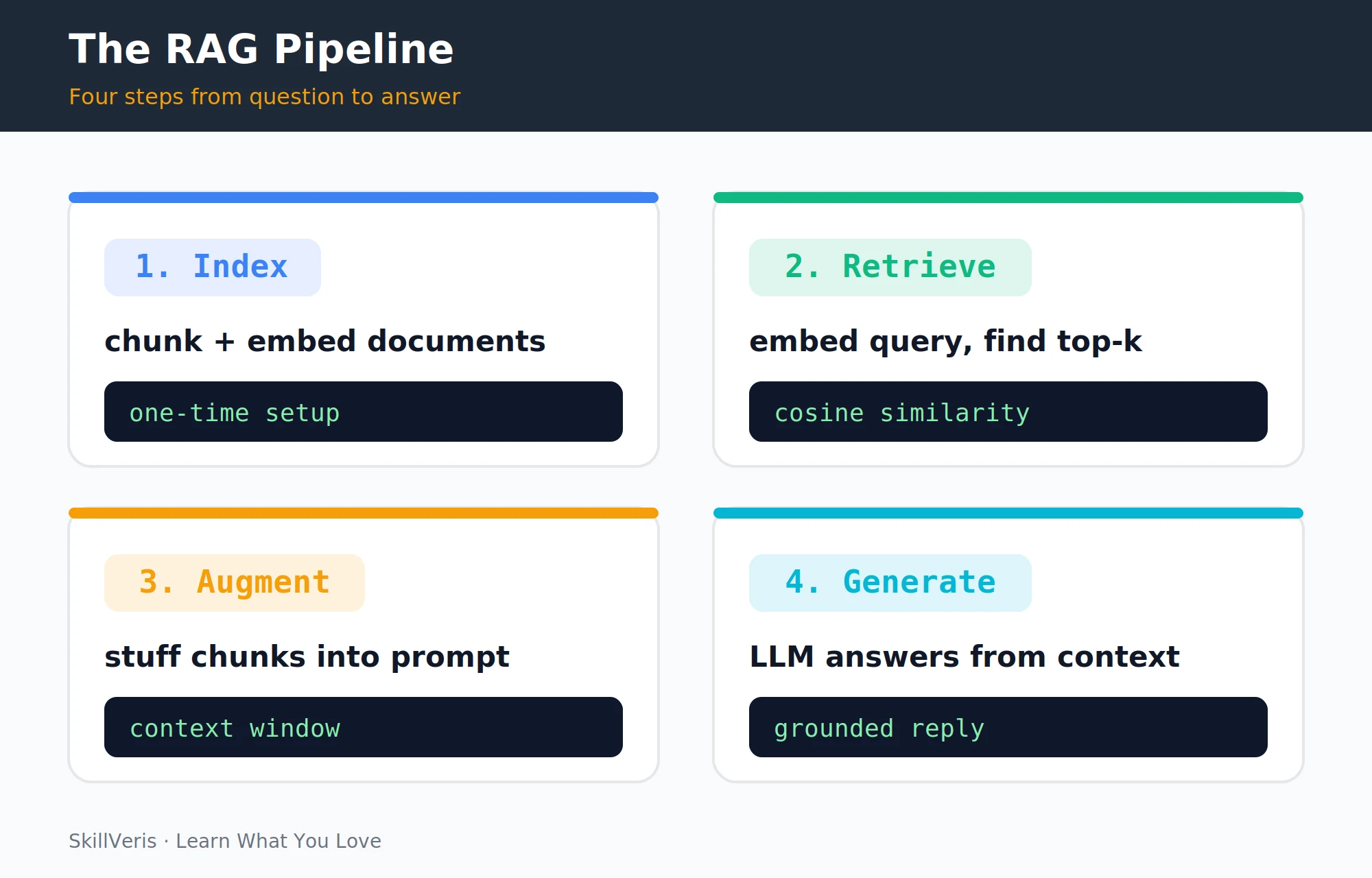
The pipeline has two phases. Indexing is a one-time setup: load documents, split them into chunks, embed each chunk as a vector, and store everything in a vector database.
Querying happens per request: embed the user's query, find the most similar chunks via vector search, include those chunks in the prompt, and let the LLM generate an answer grounded in the retrieved content.
4Step 1: Document Processing and Chunking
Documents must be split into chunks before embedding, and chunk size is a critical parameter. The separators list tells the splitter to prefer splitting at paragraph breaks, then line breaks, then sentence ends — preserving semantic coherence.
- Too small (50–100 tokens): each chunk lacks context; retrieved passages may be incomprehensible in isolation.
- Too large (2000+ tokens): few chunks fit in the context window; they may dilute the relevant content with irrelevant text.
- Sweet spot: 200–500 tokens with 10–20% overlap between adjacent chunks to prevent cutting off sentences mid-thought.
Splitting Text with LangChain
A recursive splitter chunks text while respecting natural boundaries.
from langchain.text_splitter import RecursiveCharacterTextSplitter
splitter = RecursiveCharacterTextSplitter(
    chunk_size=500,
    chunk_overlap=50,
    separators=["\n\n", "\n", ". ", " "]
)
chunks = splitter.split_text(document_text)
print(f"Split into {len(chunks)} chunks")5Step 2: Embeddings
An embedding is a list of numbers (a vector) that represents the semantic meaning of a text chunk. Chunks with similar meaning have vectors that are mathematically close together — which is how semantic search works.
- all-MiniLM-L6-v2 · 384 dims · Free, fast (local) · Best for general English text
- text-embedding-3-small (OpenAI) · 1536 dims · Low-cost API · Best for high-accuracy English
- text-embedding-3-large (OpenAI) · 3072 dims · Medium-cost API · Best for highest accuracy
- voyage-3 (Anthropic/Voyage) · 1024 dims · Low-cost API · Best for code and multilingual text
Generating Embeddings Locally
sentence-transformers runs free embedding models on your own machine.
from sentence_transformers import SentenceTransformer
# Free, runs locally, good quality
model = SentenceTransformer("all-MiniLM-L6-v2")
embeddings = model.encode(chunks, show_progress_bar=True)
print(f"Embedding shape: {embeddings.shape}") # (num_chunks, 384)6Step 3: Vector Storage
Embeddings are stored in a vector database optimised for similarity search — finding the closest vectors to a query vector in milliseconds across millions of entries.
Popular options include FAISS (local, free), Chroma (local + hosted), Pinecone (managed, generous free tier), Weaviate (open source + cloud), and pgvector (a Postgres extension that reuses your existing database).
Building a FAISS Index
FAISS builds and persists an index entirely on your own machine.
import faiss
import numpy as np
# Build a FAISS index (runs locally, free)
dimension = embeddings.shape[1]
index = faiss.IndexFlatL2(dimension)
index.add(np.array(embeddings, dtype=np.float32))
print(f"Index contains {index.ntotal} vectors")
# Save to disk
faiss.write_index(index, "document_index.faiss")7Step 4: Retrieval
Retrieval returns the k most semantically similar chunks to the query. Typical values for k are 3–10: too few and you may miss relevant information; too many and you dilute the context with marginally relevant content.
Retrieving the Top-k Chunks
Embed the query, search the index, and return the matching chunks.
def retrieve(query: str, k: int = 5) -> list[str]:
    # Embed the query
    query_vec = model.encode([query])
    # Search the index
    distances, indices = index.search(
        np.array(query_vec, dtype=np.float32), k
    )
    # Return the matching chunks
    return [chunks[i] for i in indices[0]]
results = retrieve("What is the return policy for digital products?")8Step 5: Augmented Generation
The critical instruction "Answer based ONLY on the context below" grounds the model in the retrieved documents and suppresses hallucination from training data. The fallback "I don't have that information" handles queries outside the document scope gracefully.
Grounding the Answer in Context
Inject the retrieved chunks into the prompt and call the LLM.
import anthropic
client = anthropic.Anthropic()
def rag_answer(query: str) -> str:
    context_chunks = retrieve(query, k=5)
    context = "\n---\n".join(context_chunks)
    prompt = (
        "Answer the question based ONLY on the context below.\n"
        "If the answer is not in the context, say \"I don't have that information.\"\n"
        f"Context:\n{context}\nQuestion: {query}"
    )
    response = client.messages.create(
        model="claude-sonnet-4-6",
        max_tokens=1024,
        messages=[{"role": "user", "content": prompt}]
    )
    return response.content[0].text
answer = rag_answer("What is the return policy for digital products?")
print(answer)9RAG vs Fine-Tuning
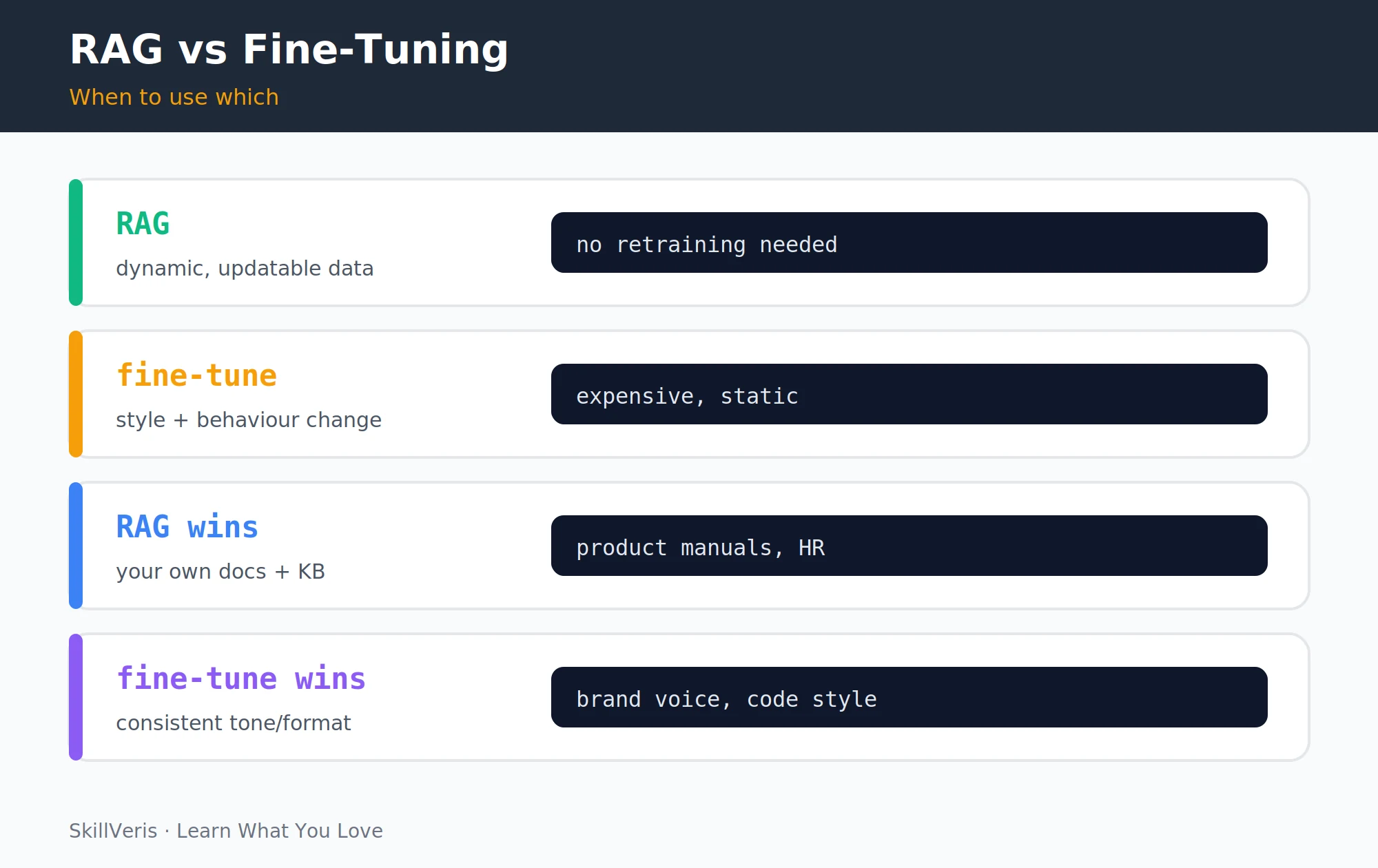
RAG and fine-tuning solve different problems — choose based on what you're trying to change. Most production systems combine both: fine-tune for style and domain vocabulary, then add RAG for factual grounding on current data.
- Knowledge update — RAG: instant (add to index) · Fine-tuning: requires retraining
- Cost — RAG: low (query-time only) · Fine-tuning: high (GPU hours)
- Hallucination on docs — RAG: low (cited from source) · Fine-tuning: baked in, harder to control
- Output style change — RAG: limited · Fine-tuning: strong
- Best use case — RAG: Q&A over your documents · Fine-tuning: custom tone, format, domain vocab
10A Working RAG Example
Here is a full minimal example — RAG over a single PDF using only free local tools for indexing plus an LLM API for generation.
End-to-End RAG over a PDF
Load and chunk, embed and index, query, then generate.
pip install pypdf sentence-transformers faiss-cpu anthropic

from pypdf import PdfReader
from sentence_transformers import SentenceTransformer
import faiss, numpy as np, anthropic, textwrap
# 1. Load and chunk PDF
text = "".join(p.extract_text() for p in PdfReader("document.pdf").pages)
chunks = textwrap.wrap(text, 500)
# 2. Embed and index
model = SentenceTransformer("all-MiniLM-L6-v2")
vecs = model.encode(chunks).astype(np.float32)
idx = faiss.IndexFlatL2(vecs.shape[1]); idx.add(vecs)
# 3. Query
q = "What are the key findings?"
qv = model.encode([q]).astype(np.float32)
_, ii = idx.search(qv, 4)
ctx = "\n".join(chunks[i] for i in ii[0])
# 4. Generate
r = anthropic.Anthropic().messages.create(
    model="claude-sonnet-4-6", max_tokens=512,
    messages=[{"role": "user",
               "content": f"Context:\n{ctx}\nQuestion: {q}"}]
)
print(r.content[0].text)11Advanced RAG Techniques
Once the basic pipeline works, these improvements address the most common failure modes.
- Hybrid search: combine vector search (semantic) with BM25 keyword search to catch exact-match queries that semantic search misses.
- Re-ranking: after retrieving top-k candidates, use a cross-encoder model to re-rank them by true relevance, improving precision significantly.
- Query rewriting: use an LLM to rephrase the user's query before embedding — handles vague, misspelled, or ambiguous questions.
- Chunking strategies: sentence-window chunking, hierarchical chunking, or semantic chunking (split by topic change rather than fixed length).
- Source citations: include the source document and page number with each retrieved chunk so the LLM can cite them in its answer.
12Key Takeaways
RAG is the most practical way to give an LLM access to your own knowledge. Keep these essentials in mind.
- RAG gives LLMs access to private, current, or domain-specific data without retraining.
- The pipeline: chunk, embed, index, then at query time retrieve, augment the prompt, and generate.
- Always instruct the model to answer only from the retrieved context to minimise hallucination.
- RAG beats fine-tuning for updatable knowledge; fine-tuning beats RAG for consistent style and behaviour.
- FAISS + sentence-transformers + any LLM API is a fully free, functional RAG stack for prototyping.
13What to Learn Next
Go deeper with the components that surround a RAG system.
- AI Agents Explained — agents use RAG as their long-term memory system.
- Prompt Engineering Guide — the augmented prompt is only as good as its design.
- Vector Databases Explained — go deeper on the storage layer.
14Frequently Asked Questions
How is RAG different from just pasting a document into the prompt? Pasting a full document works if it fits in the context window (most do in 2026 with 128k+ token models). RAG is necessary when your knowledge base is larger than the context window, when you need to search across thousands of documents, or when you want to retrieve only the most relevant passages to avoid noise in the prompt.
What vector database should I use for a production RAG system? For prototypes: FAISS (local) or Chroma (easy Python integration). For production: Pinecone (managed, scales easily), pgvector (if you already use PostgreSQL), or Weaviate (open source, self-hostable). Choose based on your team's infrastructure familiarity and scale requirements.
How do I handle questions the RAG system can't answer? Instruct the model explicitly: "If the answer is not in the context, say you don't have that information rather than guessing." You can also filter by a similarity score threshold — if the top retrieved chunk has a cosine similarity below 0.5, skip retrieval and tell the user the query is outside the knowledge base.
Does RAG work for languages other than English? Yes. Use a multilingual embedding model (e.g. paraphrase-multilingual-MiniLM-L12-v2, or voyage-3 which supports 30+ languages). The retrieval step is language-agnostic once embeddings are computed; the generation step depends on the LLM's multilingual capability, which is strong in Claude and GPT-4o.
Related Reading
Get The Print Version
Download a PDF of this article for offline reading.
About the Publisher
SkillVeris Team
AI Research Team
Our AI team covers the latest in machine learning, generative AI, and emerging tech — clearly and accurately.
View all postsRelated Posts




Never miss an update
Get the latest tutorials and guides delivered to your inbox.
No spam. Unsubscribe anytime.