Understand Variables and Data Types Using Cricket Stats
SkillVeris Team
Content Team
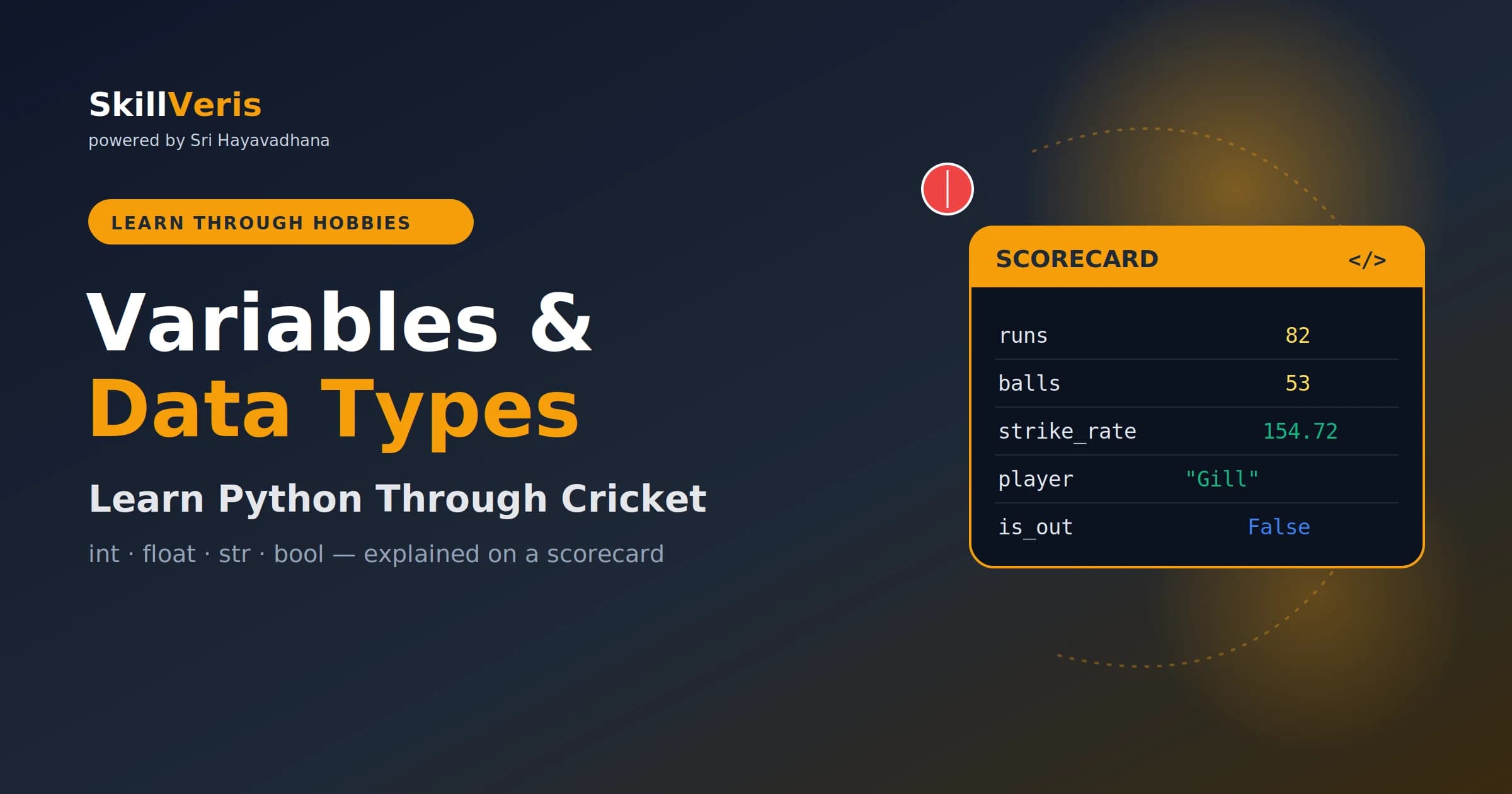
A variable is a labelled box — exactly like a column on a cricket scorecard, with a name and a value underneath it.
In this guide, you'll learn:
- Python's four core types map cleanly to cricket: int (runs/balls), float (strike rate/average), str (names), bool (out/not-out).
- Type casting with int(), float(), and str() converts between types safely — essential when reading data from files or forms.
- Collections store groups: lists for batting orders, tuples for fixed match details, dicts for player records, sets for unique opponents.
- type() and isinstance() let you inspect what a value actually is — the first debugging tool every Python programmer needs.
1About This Guide
This guide is part of the SkillVeris Learn Through Hobbies series, built on one simple idea: when you learn a technical skill through something you already love, it sticks. If you have ever argued about a batting average or checked an economy rate during a tense over, you already think in data — you just have not written it in Python yet.
By the end of this article you will be able to explain what a variable is and create your own in Python, recognise Python's four core data types and when to use each, convert one type into another safely, store an entire squad using lists, tuples, dictionaries, and sets, and build a small program that prints a clean player stat card.
No prior programming experience is assumed. If you have completed our pillar guide, Learn Python Through Cricket: Your Ultimate Beginner's Guide, this is the natural next step.
2Why Cricket Stats Make Variables Click
Cricket is one of the most data-rich sports on earth. A single delivery can produce runs, an extra, a wicket, a boundary, or a dot ball — and every one of those outcomes is a piece of information a computer can store. That makes the sport a perfect training ground for learning how programs hold and move data.
Here is the mapping we will build on throughout the guide: a single number like runs scored maps to an integer; a decimal like a batting average maps to a float; a name like "Rohit Sharma" maps to a string; a yes/no fact like "is the batter out?" maps to a boolean; and a full squad maps to a list, with each player's full record stored as a dictionary.
💡Pro Tip
Grab a real dataset before you start. The IPL ball-by-ball dataset on Kaggle is free and gives you genuine numbers to experiment with. Practising on data you care about turns every exercise into something satisfying.
3What Is a Variable? The Scorecard Analogy
Think of a scorecard. Each column has a label at the top — Runs, Balls, Fours, Sixes — and a value underneath it. In Python, a variable works the same way: a name (the label) pointing to a value (the number underneath).
Three things are worth noticing: the = sign does not mean "equals" in the maths sense — it means assign, as in "put the value on the right into the box named on the left". You can change a variable any time; after the next ball, runs = 86 simply updates the box. And Python figures out the type for you — you never have to declare "this is a number".
Your first cricket variables
Copy this into a new file called cricket_stats.py and run it. Experiment by changing the numbers.
# Label on the left, value on the right
runs = 82
balls = 53
player = "Shubman Gill"

print(player, "scored", runs, "off", balls, "balls")
# Output: Shubman Gill scored 82 off 53 balls4Naming Variables Like a Professional Scorer
A good scorer keeps a tidy book so anyone can read it. Good variable names do the same for your code. Python has a few firm rules and several strong conventions.
Hard rules — Python will error if you break these: names may use letters, numbers, and underscores but cannot start with a number (4runs is invalid; runs_4 is fine); no spaces — use an underscore (strike_rate, not strike rate); you cannot use reserved keywords such as if, class, or for as variable names.
Conventions — Python will run, but readers will judge: use lower case with underscores for ordinary variables (total_runs, wickets_taken); be descriptive — sr saves typing but strike_rate saves confusion three weeks later; reserve ALL_CAPS for fixed values that never change, like MAX_OVERS = 20.
⚠️Watch Out
Python is case sensitive. Runs, runs, and RUNS are three different variables. Mixing them up is one of the most common reasons a beginner's program quietly uses the wrong number.
5Python's Core Data Types — Through Cricket
Every value in Python has a type, and the type decides what you can do with it. You can add two scores together, but adding two player names makes no sense. Let us meet the four core types using a single innings.
Integers (int): Runs, Wickets, Balls
An integer is a whole number with no decimal point — perfect for anything you count. Integers support all the arithmetic you would expect: +, -, *, and // (whole-number division). Counting things — runs, balls, wickets, matches — almost always means an integer.
runs = 82
wickets = 3
balls_faced = 53
sixes = 4

total_boundaries = sixes + 9  # 4 sixes + 9 fours
print(total_boundaries)        # 13
Floats (float): Averages, Strike Rate, Economy
A float is a number with a decimal point. The moment you divide, you usually get one. Strike rate, batting average, and bowling economy are all floats because they rarely land on a whole number. Use round(value, 2) to keep results readable, just as a broadcaster would quote a strike rate to two decimals.
runs = 82
balls = 53

strike_rate = (runs / balls) * 100
print(round(strike_rate, 2))  # 154.72
Strings (str): Player and Team Names
A string is text, wrapped in quotes. Names, team names, and venues are all strings. Useful string tools: .upper() and .lower() change case; .strip() removes stray spaces from messy data; len(player) counts the characters; f-strings build clean formatted output.
player = "Virat Kohli"
team = "Royal Challengers Bengaluru"

headline = player + " plays for " + team
print(headline.upper())
# VIRAT KOHLI PLAYS FOR ROYAL CHALLENGERS BENGALURU
Booleans (bool): Is the Batter Out?
A boolean holds just two possible values: True or False. It answers yes/no questions, which is exactly how cricket decisions work. Booleans are the engine behind decisions — in the next guide on control flow, you will use them to decide whether to print "Fifty up!" or "Keep going".
is_out = False
is_captain = True
scored_fifty = runs >= 50  # comparison returns a boolean

print(scored_fifty) # True (because runs is 82)6Type Conversion: Turning Overs into Balls
Cricket constantly switches between units — overs and balls, percentages and decimals. Python lets you convert between types deliberately, a process called casting. The three casts you will use most are int("4") which turns text into a whole number, float("7.5") which turns text into a decimal, and str(82) which turns a number into text so you can join it to other strings.
⚠️Watch Out
You cannot add a number to a string directly. "Economy: " + 7.5 raises a TypeError. Wrap the number in str() first, or use an f-string: f"Economy: {economy}".
Casting in action
overs_text = "4"            # this is a STRING, not a number
overs = int(overs_text)     # cast string -> integer
balls = overs * 6
print(balls)                # 24

# Going the other way for display
economy = 7.5
print("Economy: " + str(economy)) # Economy: 7.57Collections: Building a Whole Team
A single variable holds one value, but cricket deals in groups — a batting order, a squad, a season's scores. Python gives you four collection types, each with a clear cricketing role.
A list is an ordered, changeable sequence — perfect for a batting order where position matters. A tuple is like a list but cannot be changed after creation — use it for fixed facts like a match venue and date. A dictionary stores labelled key-value pairs — exactly what a player stat card is. A set stores only unique values and ignores duplicates — handy for tracking which teams a player has faced.
List — the batting order
batting_order = ["Rohit", "Gill", "Kohli", "Iyer"]
batting_order.append("Rahul")   # a new batter walks in

print(batting_order[0])          # Rohit (positions start at 0)
print(len(batting_order))         # 5
Tuple — fixed match details
match = ("Wankhede", "2026-04-12", "IPL")
print(match[0])   # Wankhede
# match[0] = "Eden"  ->  raises TypeError: tuples are locked
Dictionary — a player's career card
kohli = {
    "name": "Virat Kohli",
    "matches": 280,
    "runs": 13900,
    "average": 49.6
}

print(kohli["runs"])     # 13900
kohli["runs"] = 13985    # update after a new innings
Set — unique opponents
opponents = {"AUS", "ENG", "AUS", "SA"}
print(opponents) # {'AUS', 'ENG', 'SA'} — the duplicate is dropped8Inspecting Types: type() and isinstance()
When data misbehaves, the first question is usually "what type is this, really?" Python answers with two tools. type(x) tells you exactly what something is. isinstance(x, int) asks a yes/no question and returns a boolean — useful before doing maths on data you did not create yourself.
Checking types in practice
runs = 82
average = 49.6
player = "Kohli"

print(type(runs))               # <class 'int'>
print(type(average))            # <class 'float'>
print(isinstance(player, str)) # True9Common Beginner Mistakes (and Fixes)
Knowing the pitfalls before you hit them saves hours of frustration.
- Reading numbers as text — input from a file or form arrives as a string. "82" + "5" gives "825", not 87. Cast with int() first.
- Integer division surprises — 7 // 2 is 3, not 3.5. Use a single slash / when you want a float result.
- Overwriting built-ins — naming a variable list or str breaks those tools for the rest of your program. Use player_list instead.
- "50" == 50 is False — one is text and the other a number. Convert before comparing types.
- Forgetting floats lose precision — tiny rounding errors are normal; use round() for display rather than for critical comparisons.
10Mini Project: Build a Player Stat Card
Time to put every concept together. This short program stores one innings using the right types and prints a tidy card — integers, a float, a string, a boolean, and a dictionary all working as a team.
Notice how each value uses the type that suits it: counts as integers, the rate as a float, the name as a string, the dismissal status as a boolean, and the whole record as a dictionary. That is good data modelling — the same instinct professional developers use on far larger systems.
Player Stat Card — full code
# --- Player Stat Card ---
player = {
    "name": "Shubman Gill",   # str
    "runs": 82,               # int
    "balls": 53,              # int
    "is_not_out": True        # bool
}

strike_rate = round((player["runs"] / player["balls"]) * 100, 2)
status = "not out" if player["is_not_out"] else "out"

print("================================")
print(f"  {player['name']} ({status})")
print("================================")
print(f"  Runs        : {player['runs']}")
print(f"  Balls       : {player['balls']}")
print(f"  Strike rate : {strike_rate}")
# ================================
#   Shubman Gill  (not out)
# ================================
#   Runs        : 82
#   Balls       : 53
# Strike rate : 154.7211Practice Drills and What to Learn Next
Reading code builds familiarity; writing it builds skill. Try these drills on your own before moving on.
- Create variables for a bowler: overs, runs_conceded, and wickets. Calculate and print the economy rate as a float rounded to two decimal places.
- Store three team names in a list and print the second one.
- Build a dictionary for your favourite player with at least four keys, then update one value after an imaginary innings.
- Take the string "6", cast it to an integer, multiply by 6 (one over in balls), and print the result.
- Use isinstance() to confirm that a computed strike rate is a float, not an integer.
💡Keep the Momentum
Stuck on a drill? Open the SkillVeris Code Lab and paste your attempt — the AI Mentor will explain exactly where a type went wrong, rather than just handing you the answer. Your next guide: Learn Loops in Python by Building a Cricket Scoreboard.
Get The Print Version
Download a PDF of this article for offline reading.
About the Publisher
SkillVeris Team
Content Team
We believe the best way to learn tech is through what you already love — sports, music, photography, and more.
View all postsRelated Posts
Never miss an update
Get the latest tutorials and guides delivered to your inbox.
No spam. Unsubscribe anytime.